Scrape a website with login, without giving a scraper your password

To scrape a website with login, the scraper has to see the page as a signed-in person sees it. The usual ways are to hand the scraper your username and password, or to export your cookies into it. A third way keeps both where they are: the scraper reads the page inside the browser you’re already signed in to, and you approve which sites it may read.
That third way is what Octocrawl does on your own computer. On 2026-10-09 it read our GitHub notifications page in Chrome, signed in, in 9 seconds. Without a login, the same URL answers 302 and sends you to github.com/login. Here is the run, what you click, and what Octocrawl will never do in your browser.
Which way of scraping behind a login should you use?
Octocrawl has three, all on your computer with npx octocrawl 0.3.2 or later. Hosted Octocrawl refuses all of them.
| Way | Use it when | What leaves Chrome |
|---|---|---|
--lane my-browser |
The page needs your login, your address or a real browser. | Nothing. Octocrawl opens the page in a new tab and reads it as it shows. |
--handoff |
Octocrawl’s own fetch stopped at a captcha, a challenge or a login wall. | Nothing. The stopped page opens in your Chrome, you get through, Octocrawl reads it. |
login import, then --mode authed |
You want unattended runs on one site. | That one site’s cookies, copied into Octocrawl’s own browser. |
Start with the lane. It needs you at the computer, and in exchange no password or cookie is copied anywhere.
What do you need before you start?
Google Chrome 144 or later, signed in to your sites in its default profile and a normal window, and Node.js 22.13 or later. Octocrawl reaches the default profile only.
Open chrome://inspect/#remote-debugging and turn on Allow remote debugging for this browser instance. Turn it off when you’re done: while it’s on, every page sees navigator.webdriver as true, and a site whose bot check looks at it may refuse your Chrome.
How do you read a page signed in as you?
npx octocrawl scrape https://github.com/notifications --lane my-browser --formats markdown- Chrome asks Allow remote debugging? Click Allow. Chrome asks again on every new connection.
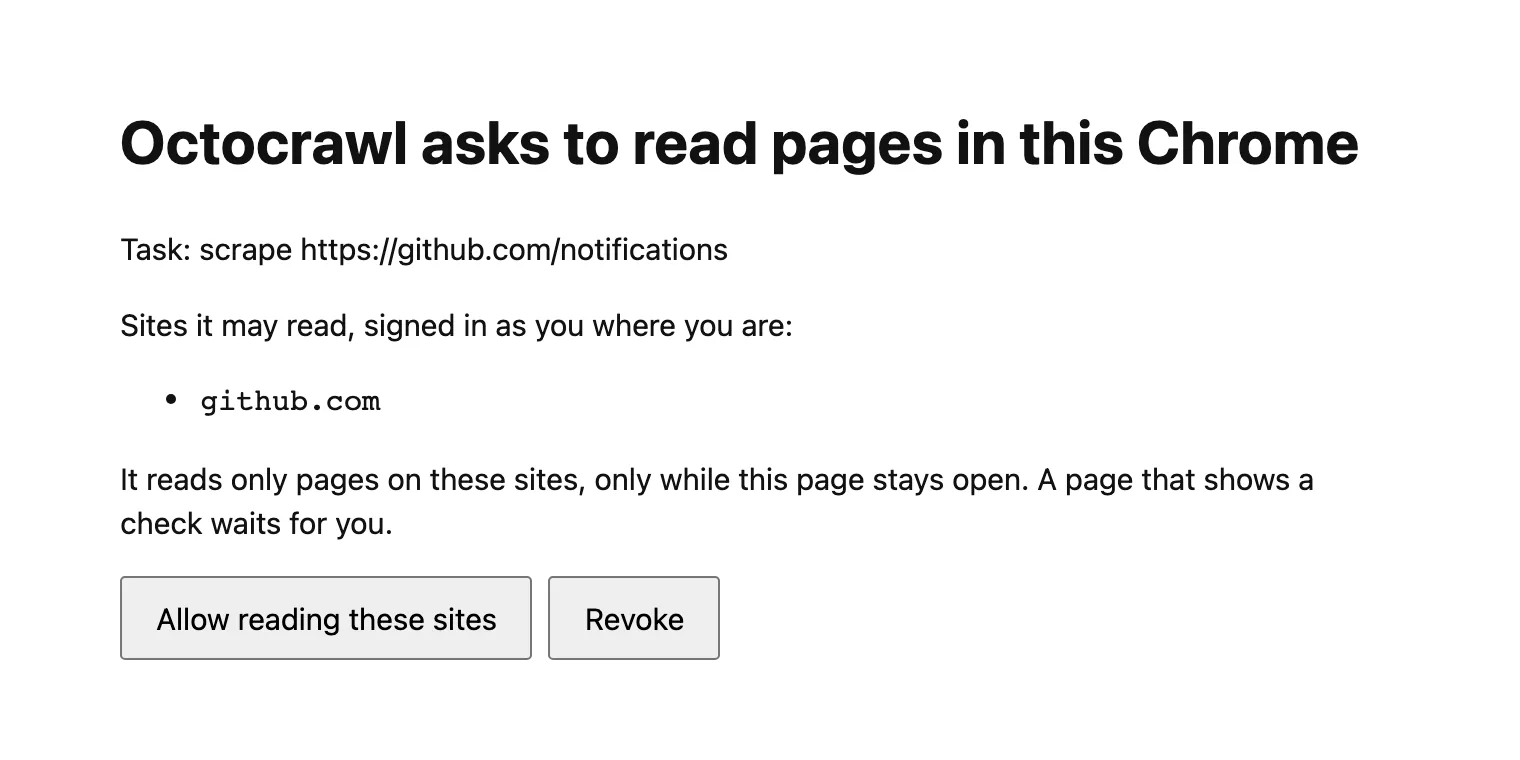
- Octocrawl opens a page of its own in a new tab, listing the sites it will read, here
github.com. Click Allow reading these sites. Only a click Chrome counts as yours allows them; a script can’t. You have 10 minutes, and the tab may open behind the one you’re on or in another window. - Octocrawl opens the URL in another new tab, reads it once it has loaded, shows no check and stays on that host, then closes the tab. Closing Octocrawl’s page, or clicking Revoke on it, stops all reading.
The same lane is "lane": "my-browser" on POST /v1/scrape and POST /v1/batches of npx octocrawl serve, on the local MCP server’s scrape and batch_scrape tools, and on the TypeScript SDK. A batch reads its pages one at a time, and you allow its sites once for the run.
What does a signed-in scrape return?
Our run at 15:34 UTC on 2026-10-09, on macOS with Chrome 154, finished in 9 seconds, one second of it waiting for the click. The page’s Markdown is left out here, since it’s the account’s own notifications:
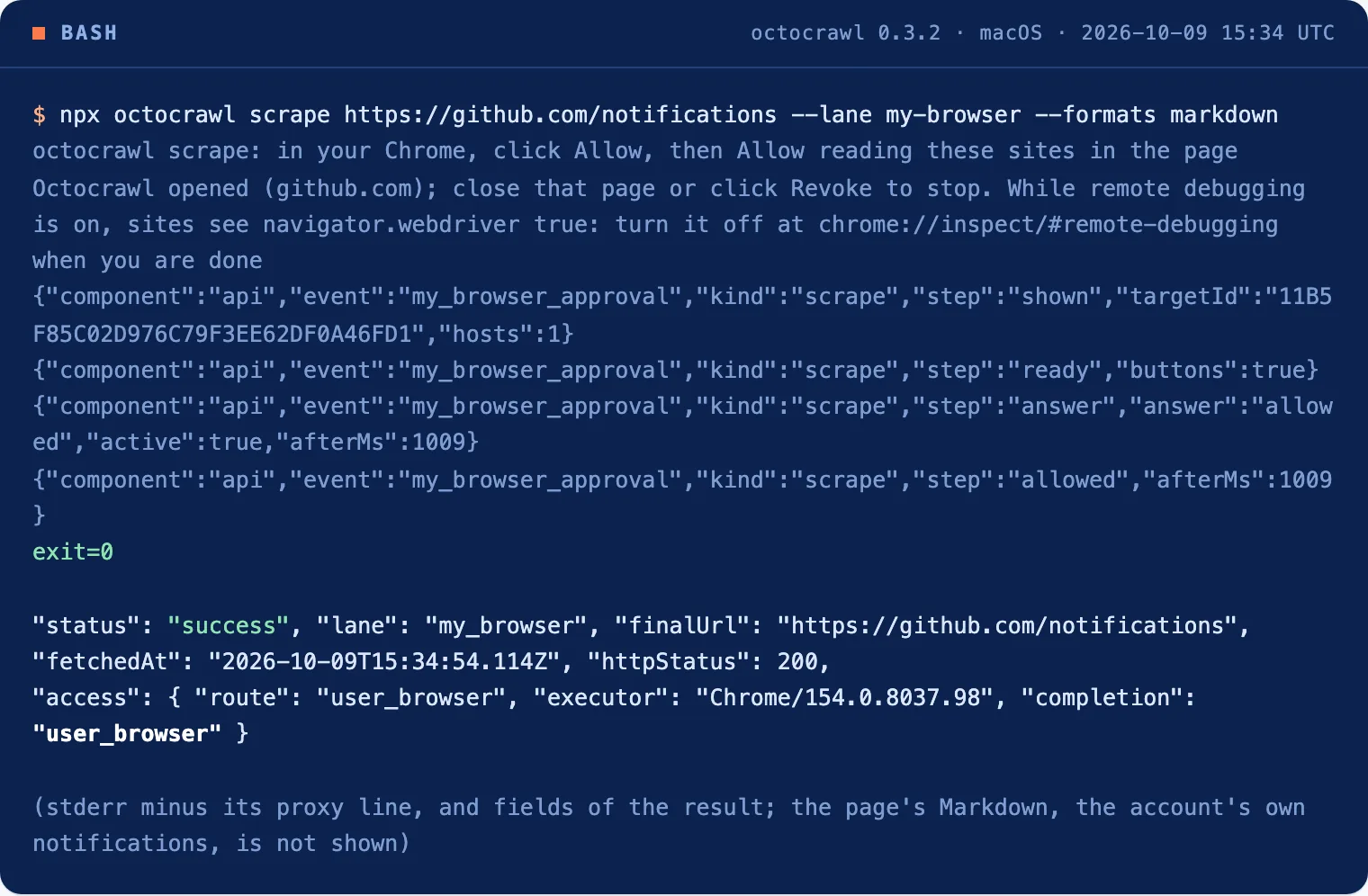
{
  "status": "success",
  "lane": "my_browser",
  "finalUrl": "https://github.com/notifications",
  "usage": { "requestCount": 0, "browserMs": 4038 },
  "evidenceRecord": {
    "httpStatus": 200,
    "robotsDecision": null,
    "access": {
      "route": "user_browser",
      "executor": "Chrome/154.0.8037.98",
      "completion": "user_browser"
    }
  }
}
requestCount: 0: Octocrawl sent no request of its own. Your Chrome loaded the page, so there’s no robots.txt decision either.access.executoris the browser that read the page.access.completionsays how the page was reached:user_browser(your Chrome, no step of yours),handed_to_person(your Chrome, after you got through a check),authorized_session(a saved login) orunattended(Octocrawl’s own fetch).
The first run that day returned nothing. Nobody clicked Allow reading these sites within 10 minutes, so the command exited 1 with you did not allow the sites in Chrome within 10 minutes: the page was not clicked. Nothing is read until you say so.
What if a page stops at a captcha or a login wall?
npx octocrawl scrape https://example.com/page --handoffOctocrawl first reads the page as usual. If a captcha, a challenge or a login wall stops it, the page opens in a new tab of your Chrome. You get through it there, and Octocrawl reads the page once you have clicked or typed in that tab and the check is gone. Nothing the page does by itself counts, such as a reload or a check that passes on its own.
It waits 10 minutes per page by default. On the API, "handoff": { "waitMs": 60000 } sets the wait, here to one minute, anywhere from 10 seconds to 30 minutes. For a batch, octocrawl batch <urls> --handoff opens its stopped pages one at a time when it ends.
Can it run unattended with your login?
Yes, with a saved login, and that does copy cookies:
npx octocrawl login import example.com
npx octocrawl scrape https://example.com/account --mode authed
login import copies one site’s cookies from your Chrome’s default profile, plus the localStorage of its open tabs. Octocrawl’s own browser then uses them for --mode authed on scrape and batch. crawl refuses it, since following a sign-out link would end your session in Chrome too. The login is kept in ~/.w2l/sessions.json, readable by you alone but not encrypted. npx octocrawl login remove example.com deletes it. A site that ties its login to more than cookies answers as if you were signed out.
What does Octocrawl never do in your browser?
- It never clicks or types in your Chrome, and never solves a captcha or a check. Page
actionsyou ask for run in Octocrawl’s own browser. - It doesn’t read a page while it shows a password or one-time-code field, or while you’re changing a form field.
- It opens tabs of its own, touches no others, and closes them when done.
- On the lane and the handoff it copies no cookies. Only
login importdoes, and only that site’s. - It isn’t a way past bot checks. A site that refuses automated visitors may refuse your Chrome too while remote debugging is on.
If a run doesn’t finish, the result says why: blocked with a blockReason such as captcha when a check was still showing, cancelled when you revoked the sites or closed Octocrawl’s page, and a my_browser_not_read warning on a page that wasn’t read. Limits and result states lists them all.
When is this the wrong approach?
- You need it on a server. The lane and the handoff need you and your Chrome. A saved login runs unattended, with the cookie trade-off above.
- Windows and Linux. Our runs were on macOS with Chrome 154. The other systems haven’t been checked yet.
- Scraping other people’s accounts. Read pages your own login can see, under the site’s terms.
FAQ
Is it safe to give a web scraper my password?
You don’t have to with this setup. On the lane, Octocrawl reads the page in the Chrome you signed in to, and your password and cookies stay in Chrome.
How do I scrape a page that needs two-factor authentication?
Sign in yourself in Chrome, including the 2FA step, then use --lane my-browser. Octocrawl reads the page after you’re in and never sees the code.
Our notifications page took one click to allow and 9 seconds to read, and the result says it was your Chrome that read it. To run the same thing from an agent, start the local MCP server.