Extract structured data from a web page, and see where each value came from

To extract structured data from a web page is to turn what the page states, such as a title, a price or a stock level, into named fields in JSON that a program can use. Most pages already state these in ways a program can read: JSON-LD and microdata in the HTML, meta tags, and table rows with a label beside each value. Reading those doesn’t need an AI model.
On 2026-10-09 we asked Octocrawl for six fields from a product page on books.toscrape.com, a site built for scraping practice. Five came back, each with the place on the page it was read from. The sixth, an ISBN the page doesn’t state, came back missing with a reason instead of a guess. No model was called. Here is the request, the answer and how to read it.
How do you extract fields from a page without code?
Paste the URL into the Octocrawl page, open Options, add your fields (or click + product fields for eight common ones), then press Extract page and switch the result to Fields.
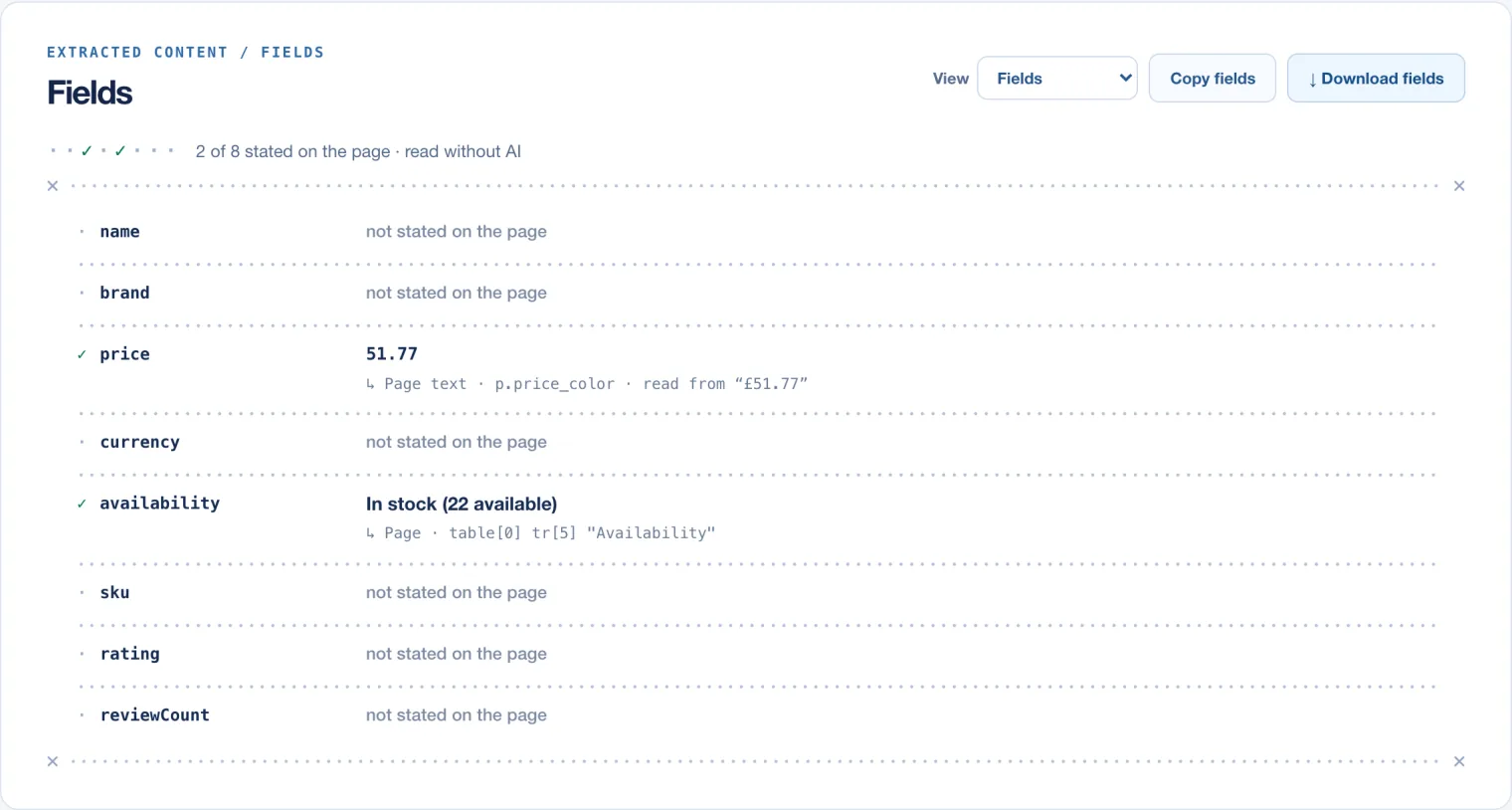
Each field is marked ✓ when the page states it and · when it doesn’t, and under each value is where it was read. Here price is 51.77, read from p.price_color whose text is “£51.77”, and availability from the row labelled “Availability” in the page’s first table.
The preset found 2 of its 8 fields, and that says more about names than about the page. The page has a title, a UPC and a review count. But a field called name isn’t read from the page’s heading the way title is, and the page labels the other two “UPC” and “Number of reviews”, not sku and reviewCount. Name your fields the way the page labels them, as the next request does.
How do you extract structured data with an API?
Send a json format with a JSON Schema. Octocrawl fills the schema from the page and checks the result against it:
{
  "url": "https://books.toscrape.com/catalogue/a-light-in-the-attic_1000/index.html",
  "formats": ["markdown", {
    "type": "json",
    "schema": {
      "type": "object",
      "properties": {
        "title": { "type": "string" },
        "upc": { "type": "string" },
        "price_incl_tax": { "type": "number" },
        "availability": { "type": "string" },
        "number_of_reviews": { "type": "integer" },
        "isbn": { "type": "string" }
      },
      "required": ["title", "upc", "price_incl_tax"]
    }
  }]
}curl -s https://api.octocrawl.dev/v1/scrape \
-H 'content-type: application/json' --data @request.jsonThe answer came back in about 4 seconds:
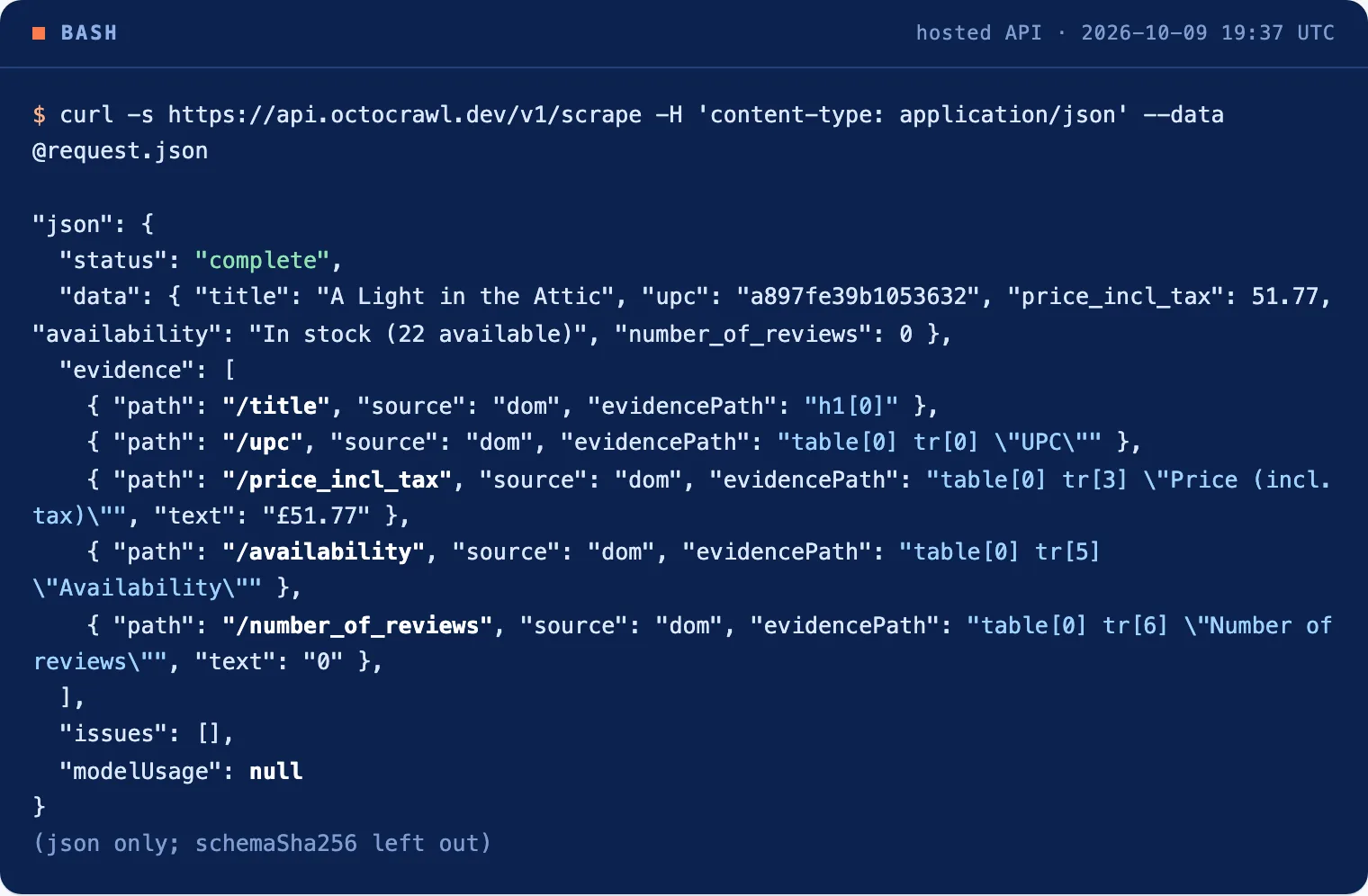
The same schema works from the MCP scrape tool, the SDKs, and npx octocrawl serve on your computer. A schema can be what Pydantic’s model_json_schema() or zod-to-json-schema writes; the reference lists the keywords it accepts.
How do you know where each value came from?
json.evidence has one entry per value:
| Field | Value | Read from |
|---|---|---|
title |
A Light in the Attic | h1[0], the page’s first heading |
upc |
a897fe39b1053632 | table[0] tr[0] "UPC" |
price_incl_tax |
51.77 | table[0] tr[3] "Price (incl. tax)", text £51.77 |
availability |
In stock (22 available) | table[0] tr[5] "Availability" |
number_of_reviews |
0 | table[0] tr[6] "Number of reviews", text 0 |
Every source is dom: the page itself. For a number, the evidence also quotes the text it was read from, so you can see that £51.77 became 51.77. Numbers are read as the page writes them: 12,99 € is 12.99 and 1.299,00 € is 1299. A number the format leaves open, such as 1.299 €, is left out with an issue rather than guessed.
Values can also come from JSON-LD, microdata, meta tags, definition lists and a PDF’s Label: value lines. The answer’s modelUsage is null: no model was asked.
What happens when a field isn’t on the page?
It stays empty, and the answer says so. isbn was optional in the first request, so it was simply left out and the result was complete. When we sent the same request with isbn added to required, the result changed:
{
  "status": "incomplete",
  "issues": [
    { "code": "missing_required", "path": "/isbn", "message": "required field unavailable: /isbn" }
  ]
}
The other five values came back as before. Use required for the fields your code can’t do without, and check json.status before you trust the record: complete, incomplete, or invalid when a model’s answer didn’t fit the schema twice.
When do you need an AI model for extraction?
When the page doesn’t state the value anywhere a program can read: it’s only in a paragraph, or only in an image. Set modelFallback: true and point W2L_EXTRACT_BASE_URL and W2L_EXTRACT_MODEL at a model when you run Octocrawl yourself. The model fills only what the page didn’t give. Every value the page stated keeps its page evidence, and a value from the model is marked model.
When is this the wrong tool?
- Pages that state nothing. No labels, no tables, no JSON-LD: without the model fallback, those fields come back missing.
- Scanned PDFs. Octocrawl reads a PDF’s text layer and has no OCR.
- Pages behind a login. Hosted Octocrawl reads public pages. On your computer, read them in your own Chrome.
- The same fields from many pages. Use the same
jsonformat in a batch of URLs.
FAQ
Do I need an LLM to extract structured data from a website?
Not for values the page states in its HTML: JSON-LD, microdata, meta tags or labelled rows. Octocrawl reads those without a model. You need one only for values written in free text.
What is JSON-LD?
A block of JSON in a page’s HTML that describes the page in schema.org terms, such as a product with its name, price and availability. Many shops add it for search engines, which makes it the most reliable source for product fields.
Five values, five places on the page, and one honest gap: that’s a record you can check before you use it. The Evidence Record covers what else each answer carries.