How to find all pages on a website, and see where each URL came from

To find all pages on a website, read the sitemaps it declares and the links on its start page, then filter the URLs to the site and the section you care about. A site map tool does that in one call: it lists a website’s page URLs without opening each page, and records where it found every one.
Octocrawl’s map is that call, and it also counts what it left out and why. On 2026-10-09 it listed 358 URLs for modelcontextprotocol.io in about a second, and 11 when we asked only for pages about transports. Here is how to run it and how to read the answer.
How do you list every page of a site?
Hosted Octocrawl maps a site with no key. A map counts as one page of the daily allowance, 20 a day per address.
curl -s https://api.octocrawl.dev/v1/map \
  -H 'content-type: application/json' \
  -d '{"url": "https://modelcontextprotocol.io", "search": "transports"}'
On your own computer, with no daily limit, the CLI does the same:
npx octocrawl map https://modelcontextprotocol.io --search transports --limit 3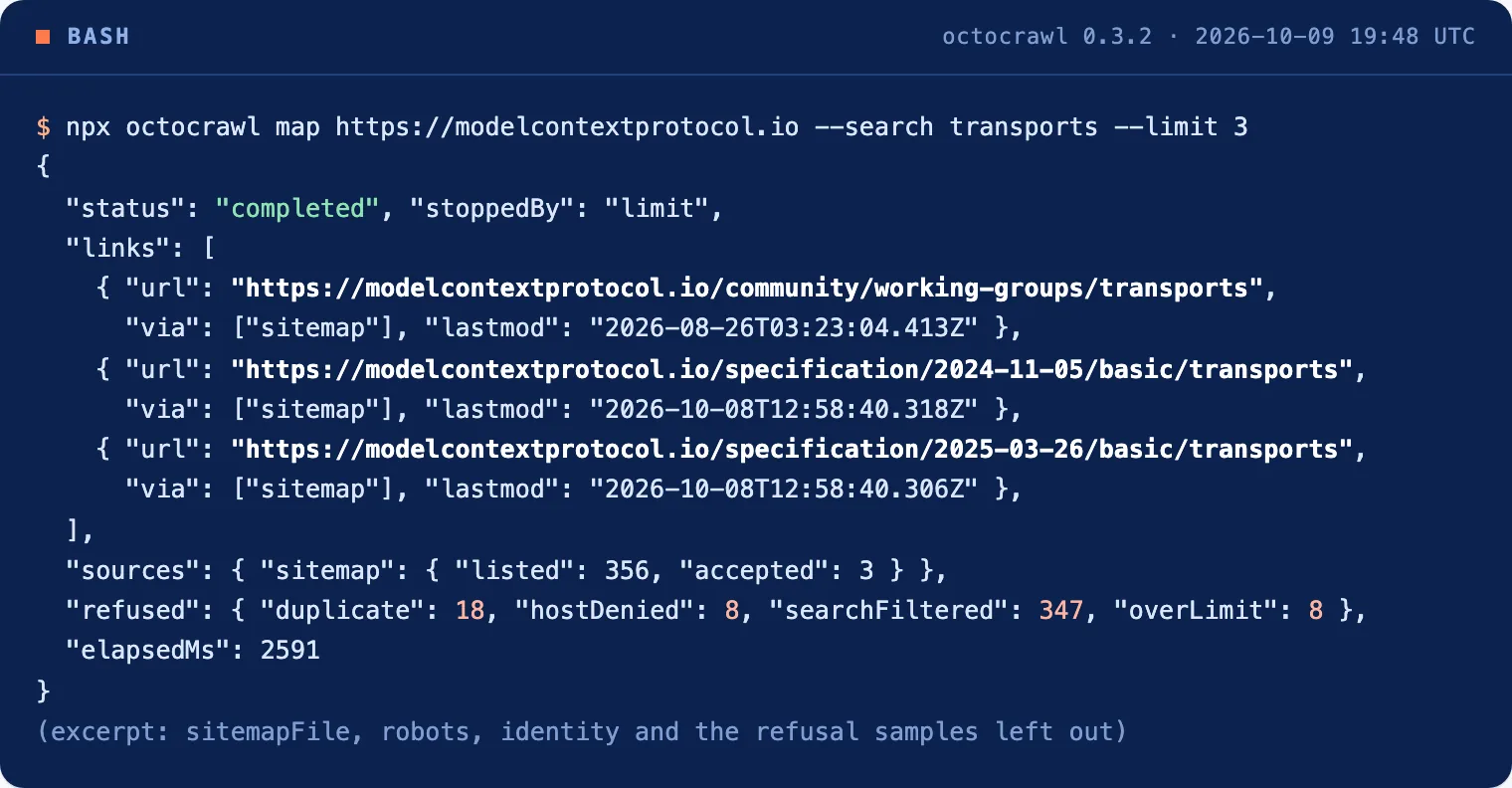
From an agent, ask for it in plain words, as in our Claude Code walkthrough: “Use Octocrawl map on https://modelcontextprotocol.io with search “streamable http””. The SDKs call the same route: new W2L({ baseUrl }).map(url, options) in TypeScript and W2L(...).map(url, **options) in Python.
Where does each URL in the list come from?
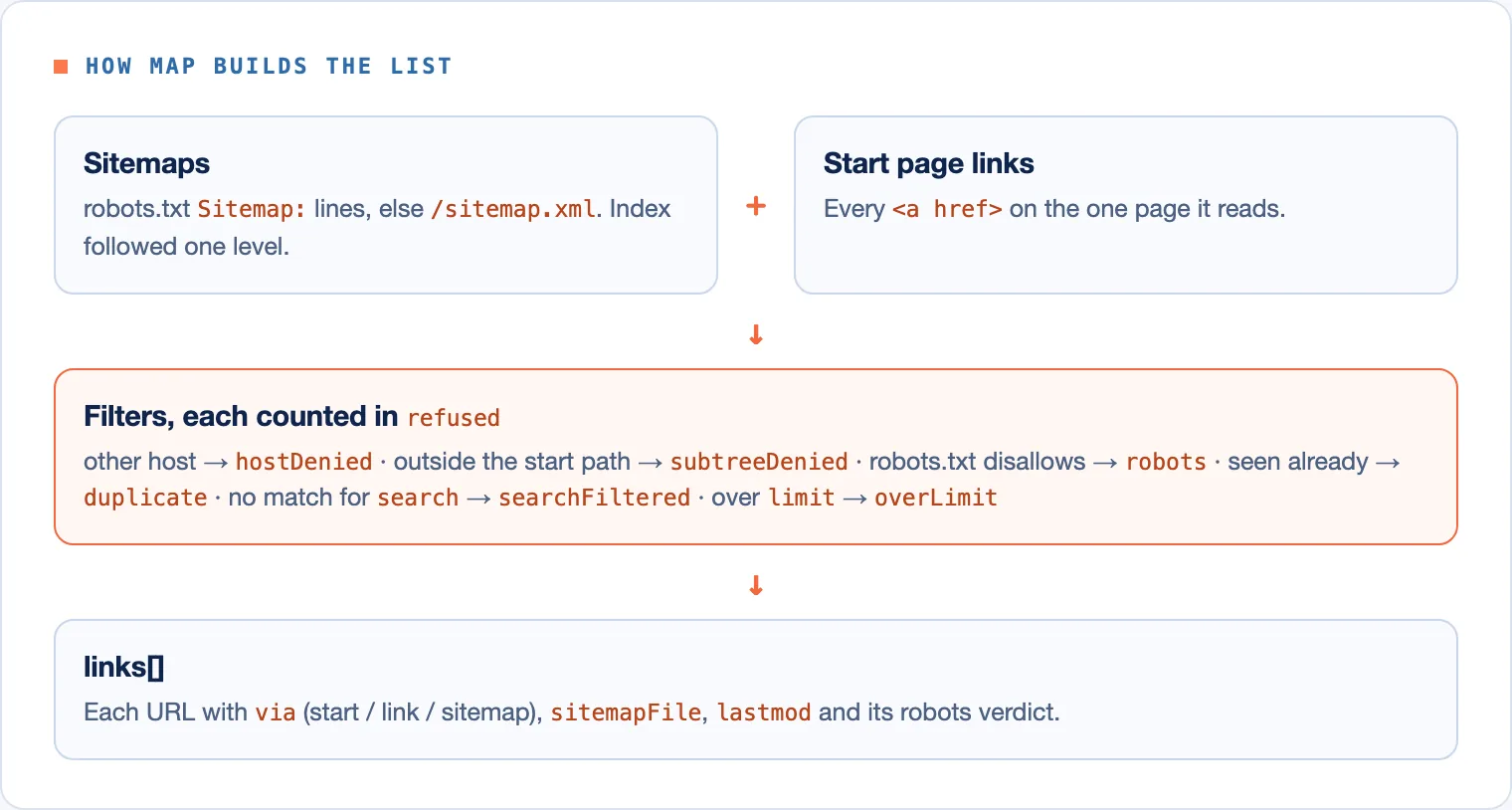
From two places, and the answer says which one for every URL:
- The sitemaps the site declares. Octocrawl reads the
Sitemap:lines of the site’s robots.txt, or/sitemap.xmlwhen there are none, and follows a sitemap index one level down. The sitemaps protocol is what makes these lists possible. - The links on the start page. Only the start page is read, which is why a map takes seconds.
The hosted curl above returned 11 URLs in 1.2 seconds. Here are its first two links and the counts:
{
  "status": "completed",
  "links": [
    {
      "url": "https://modelcontextprotocol.io/community/working-groups/transports",
      "via": ["sitemap"],
      "sitemapFile": "https://modelcontextprotocol.io/sitemap.xml",
      "lastmod": "2026-08-26T03:23:04.413Z",
      "robots": "allowed"
    },
    {
      "url": "https://modelcontextprotocol.io/specification/2024-11-05/basic/transports",
      "via": ["sitemap"],
      "sitemapFile": "https://modelcontextprotocol.io/sitemap.xml",
      "lastmod": "2026-10-08T12:58:40.318Z",
      "robots": "allowed"
    }
  ],
  "sources": { "sitemap": { "sources": ["robots"], "listed": 356, "accepted": 11 } },
  "refused": { "duplicate": 18, "hostDenied": 8, "searchFiltered": 347 },
  "elapsedMs": 1200
}
via is start, link or sitemap, and a URL found both ways lists both. sitemapFile and lastmod name the sitemap that listed the URL and the date it gave. A title, when there is one, comes from the start page’s <title>, a link’s text or a news sitemap. A map never opens a page to fetch its title.
Why are some pages missing from the list?
Because something left them out, and refused says what. In the run above, 347 URLs didn’t match search, 18 repeated a URL already seen, and 8 were on other hosts (among them blog.modelcontextprotocol.io, github.com and discord.gg). The other common reasons:
- The path. A map stays inside the start URL’s path. Starting at
https://modelcontextprotocol.io/docsreturned 117 URLs, all under/docs, and counted 248 links and sitemap entries elsewhere on the site assubtreeDenied. Starting at the root returned 358. Start at the root, or setcrawlEntireDomain, to list everything. - robots.txt. URLs that robots.txt disallows are counted in
refused.robotsand not listed. Hosted Octocrawl always obeys it, as described in RFC 9309. - No sitemap. Then the list is only the start page’s links. Reading further means a crawl, which reads every page it finds (
npx octocrawl crawlon your computer). - Links built by JavaScript. A map doesn’t run scripts. The answer flags
start_page_client_rendered, and a scrape withformats: ["links"]in a real browser gets them.
How do you narrow the list?
| Option | What it does |
|---|---|
search |
Keeps URLs whose address or title contains every word, ignoring case. It filters and does not rank. |
limit |
The most URLs to return: 5,000 by default and at most on hosted Octocrawl, up to 100,000 on your computer. |
sitemap |
include by default. skip reads only the start page, only reads only the sitemaps. |
includeSubdomains |
Also keeps docs., blog. and other hosts under the start domain. |
crawlEntireDomain |
Keeps URLs outside the start URL’s path. |
includePaths, excludePaths |
Regular expressions on the path. An exclude wins. |
A map that reaches limit is completed with stoppedBy: "limit", as the CLI run above shows. A map that hits its timeout (60 seconds by default) returns what it found, as partial.
When is a map not enough?
- You need every page’s content. A map lists URLs. To read them, scrape the list in a batch.
- You need each page’s status code, as in an SEO audit. A map doesn’t request the pages it lists, so it can’t tell you which ones return 404.
- The site has no sitemap and few links. Use a crawl on your computer instead.
FAQ
How do I find all pages on a website for free?
Map it with hosted Octocrawl, which takes no key and counts each map as one of 20 free pages a day. On your computer, npx octocrawl map has no daily limit.
How do I find hidden pages on a website?
A page that no sitemap lists and no page links to can’t be found from outside. A map shows what the site publishes, and the counts show what it left out.
Can I get all URLs from a sitemap only?
Yes. Set sitemap: "only" (--sitemap only on the CLI) to skip the start page and list just the sitemap entries.
Why does my list stop at 5,000 URLs?
That’s the default limit and the hosted maximum. On your computer, raise limit up to 100,000.
The 358 URLs for modelcontextprotocol.io each came with where they were found, and the ones left out came with a reason. That’s the difference between a list and a list you can trust. For using the list in a pipeline, see web scraping for RAG.