Claude Code web scraping, with sources you can check

Claude Code can scrape the web once you give it a web tool over MCP. Claude Code web scraping, in this setup, means Claude calls a scraping server’s tools to list a site’s pages, read them as Markdown and answer from them, with each answer traceable to the page it came from. Octocrawl is that server: one command adds it, and no account is needed.
On 2026-10-09 we asked Claude Code a question it could only answer by reading the web, with its own web tools switched off. It found the right page on its second search, read it, and cited the page’s final URL and the time it was fetched. That run is below, with the command that set it up.
How do you add a web scraping tool to Claude Code?
Run this in the project where you use Claude Code:
claude mcp add --transport http octocrawl https://mcp.octocrawl.dev/mcpThe server is added for that project only, which is the default --scope local. Use --scope user to have it in every project, or --scope project to share it with your team through the repository’s .mcp.json. claude mcp list checks that it connects. The Claude Code MCP docs cover the scopes in more detail.
Claude Code then has three tools from hosted Octocrawl:
| Tool | What it does | Without a key |
|---|---|---|
map |
Lists a site’s URLs from its sitemaps and the links on its start page, without reading each page. | Yes |
scrape |
Reads one page as Markdown, with an Evidence Record: final URL, fetch time, HTTP status, robots.txt decision. | Yes |
scrape_product |
Checked product JSON for an Amazon.sg product page. | Needs a key |
Without a key you get 20 pages a day per address, read over plain HTTP, and each map counts as one page. A key raises that and adds a real browser for pages that only appear in one.
What does a real Claude Code scraping session look like?
We gave Claude Code (version 2.1.295, with Claude Opus 5.5) this prompt and nothing else:
Use Octocrawl's map tool to find the pages on https://modelcontextprotocol.io about streamable http, then use its scrape tool on the 2025-11-25 specification page you found. Tell me which HTTP methods a client uses on the MCP endpoint, and cite the page's final URL and the fetch time from its evidence record.Claude Code’s built-in WebFetch and WebSearch tools were turned off for the run, so every page came through Octocrawl. It took 5 turns and 25 seconds.
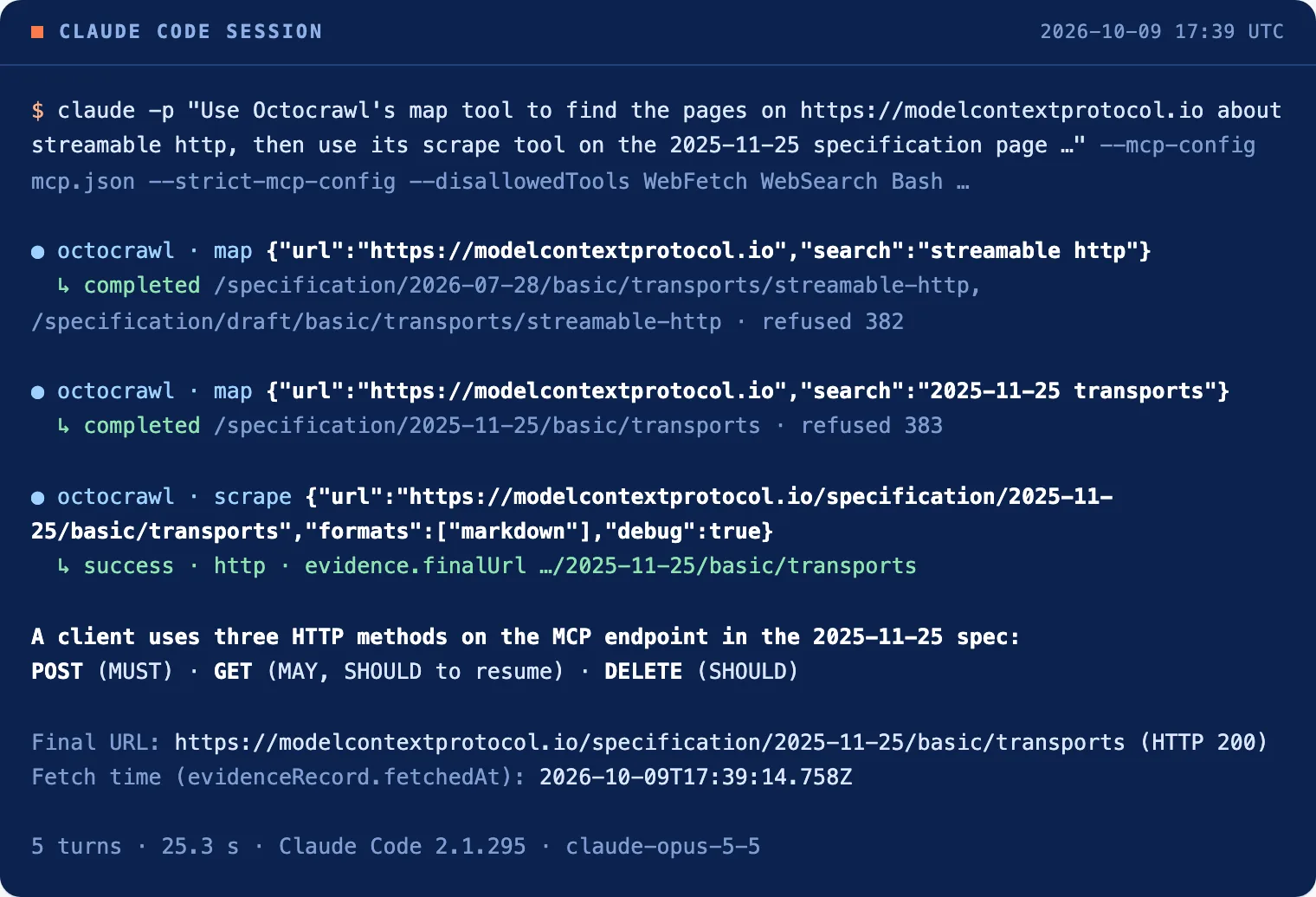
The interesting part is the second step:
mapwithsearch: "streamable http"returned two pages, both from newer versions of the specification (2026-07-28anddraft).- Claude noticed that the 2025-11-25 version had no page with that name. It ran
mapagain withsearch: "2025-11-25 transports"and got one URL,/specification/2025-11-25/basic/transports, with 383 others left out. scraperead that page:status: success, read over HTTP, 14,522 characters of Markdown.- Claude answered with the three methods a client uses on the MCP endpoint, with the specification’s requirement level for each: POST (MUST), GET (MAY, and SHOULD for resuming a dropped stream) and DELETE (SHOULD). It cited:
Final URL: https://modelcontextprotocol.io/specification/2025-11-25/basic/transports (HTTP 200, no redirects)
Fetch time (evidenceRecord.fetchedAt): 2026-10-09T17:39:14.758Z
Those two lines are what make the answer checkable. You can open that URL and find the sentences Claude quoted. If the page changes next month, the fetch time tells you which version Claude read.
Why does the source matter when Claude scrapes?
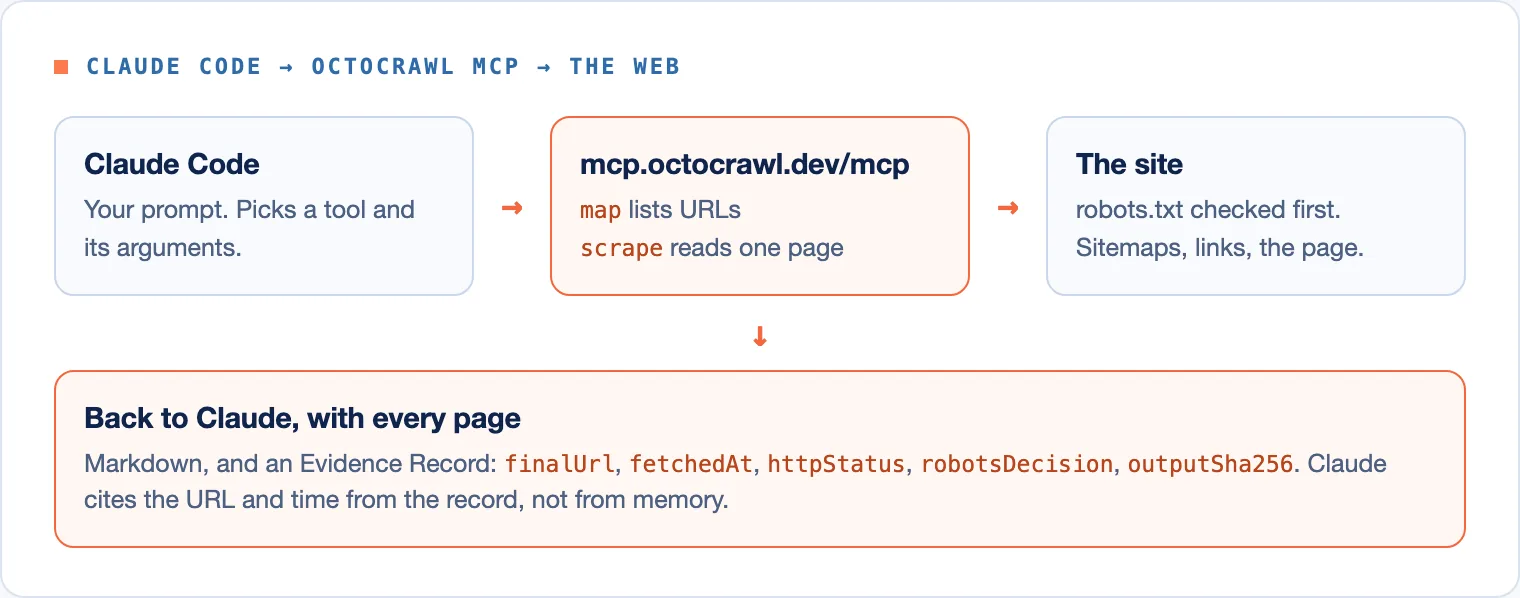
A model that reads the web can still misattribute what it read. A URL in the answer is only as good as the record behind it. Every Octocrawl scrape answer carries an Evidence Record, so the citation Claude gives comes from the fetch itself, not from its memory of where it read something:
finalUrlis the address that answered, after redirects.fetchedAtis when the answer arrived.robotsDecisionsays whether robots.txt allowed the read. Hosted Octocrawl always obeys it.outputSha256.markdownis a hash of the exact Markdown Claude received.
In the run above, the record also kept the robots.txt hash that allowed the read. None of this needs a debug flag: it’s in every answer. Asking for debug: true adds how the page was reached, each step it tried.
How do you ask Claude for the right result?
Claude follows the tools it’s told about. These prompts worked well in our runs:
- For one page, name the URL and say what you need from it: a section, a summary, a table.
- For a site, ask it to
mapfirst with asearchword, thenscrapethe pages that match. Finding all pages on a website explains whatmapcan and can’t see. - For proof, ask for the final URL and fetch time from the evidence record, as in the prompt above.
- When a page can’t be read, the tool says why (
blocked,timeout) instead of returning an invented page. Tell Claude to report that rather than guess.
When is Octocrawl the wrong tool for Claude Code?
Use something else, or another part of Octocrawl, in these cases:
- A quick look at one page, no citation needed. Claude Code’s own
WebFetchis already there and costs nothing to set up. - Pages behind your login. The hosted server refuses them. On your computer, Octocrawl can read pages signed in as you in your own Chrome.
- Hundreds of pages. Hosted Octocrawl has no batch or crawl. Run it locally instead: start
npx octocrawl serve, thenclaude mcp add octocrawl -- npx -y @octocrawl/mcp. That gives Claude every tool with no daily limit. Use another name, such asoctocrawl-local, if you keep the hosted one. - Sites that block automated readers. A page that refuses a plain request comes back
blocked. Hosted Octocrawl does not try to get past checks.
FAQ
Can Claude Code scrape websites on its own?
Yes, for a quick read. Claude Code has built-in WebFetch and WebSearch tools. An MCP server such as Octocrawl adds listing a site’s URLs, Markdown with tables kept, and an evidence record per page.
Does Claude Code web scraping need an API key?
Not with hosted Octocrawl. Without a key you get 20 pages a day per address. A key raises the allowance, and running Octocrawl on your computer has no daily limit.
Why does Claude Code’s fetch return 403 on some sites?
The site refused the request, often because it blocks automated readers. Octocrawl answers such a page with its status and a reason, blocked when it recognises a bot check, and on your computer you can get through the check yourself in your own Chrome.
Can Claude Code scrape a whole site?
It can list a whole site with map on the hosted server. To read every page, run Octocrawl locally and use crawl or batch_scrape, which the hosted server doesn’t offer.
Claude found the right page on its second try because map told it which pages existed. Give it that list and a record of every fetch, and its answers come with a place you can check. Setup for Cursor, OpenCode and Codex is on Connect MCP.