How to scrape a list of URLs and keep every failure

To scrape a list of URLs is to read every page on a list you already have, and get back one result per URL: the page’s content when it worked, and the reason when it didn’t. The second half is the one most tools skip. A list of 500 URLs that comes back as 487 rows leaves you guessing which 13 are missing and why.
On 2026-10-09 we gave Octocrawl a list of six pages from books.toscrape.com, a site built for scraping practice, with one address we knew didn’t exist. It read the list in 4.3 seconds and wrote six rows: five success and one failed, with the reason http_error and the status 404. Here’s the command, what it wrote, and how to handle the rows that fail.
How do you scrape a list of URLs from a file?
Put the URLs in a text file, one per line. A # starts a comment, and blank lines are skipped:
# Four book pages, one category page, and one address that answers 404.
https://books.toscrape.com/catalogue/a-light-in-the-attic_1000/index.html
https://books.toscrape.com/catalogue/tipping-the-velvet_999/index.html
https://books.toscrape.com/catalogue/soumission_998/index.html
https://books.toscrape.com/catalogue/sharp-objects_997/index.html
https://books.toscrape.com/catalogue/category/books/poetry_23/index.html
https://books.toscrape.com/catalogue/this-book-does-not-exist_0/index.html
Then run a batch on your computer:
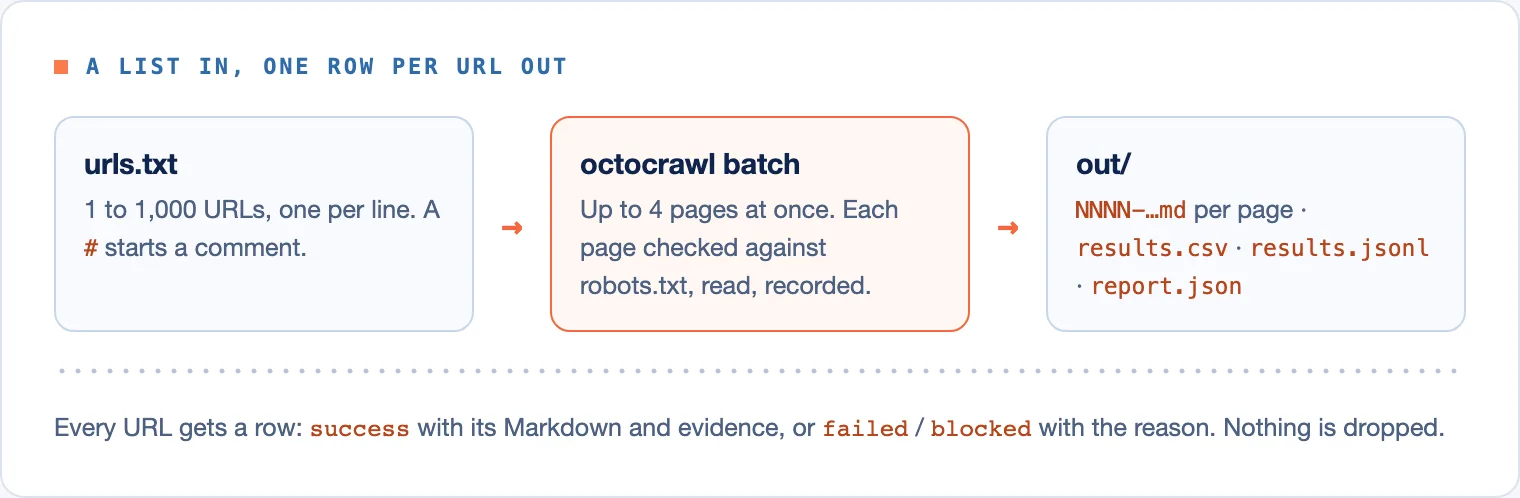
npx octocrawl batch --urls-file urls.txt --formats markdown --out outA batch takes 1 to 1,000 URLs and reads up to 4 pages at once (--max-concurrency lowers it). Every page is checked against the site’s robots.txt before it’s read. If you don’t have the list yet, find all pages on the website first.
What does the batch write?
The command printed one line when it finished, wrote 6 results (results.jsonl, results.csv), 6 Markdown files and 0 CSV tables to out, and exited 0. The out/ folder held:
- One Markdown file per page, named
0001-books.toscrape.com-catalogue-…mdand so on. results.csv: one row per URL, withurl,status,reason,final_url,fetched_at,http_status,lane,robots_decision,raw_sha256,markdown_sha256,extractorandmarkdown_file, among others.results.jsonl: each page’s whole answer, one per line, with its Evidence Record.report.json: the totals. Ours saidrequested: 6,succeeded: 5,failed: 1,wallMs: 4258.
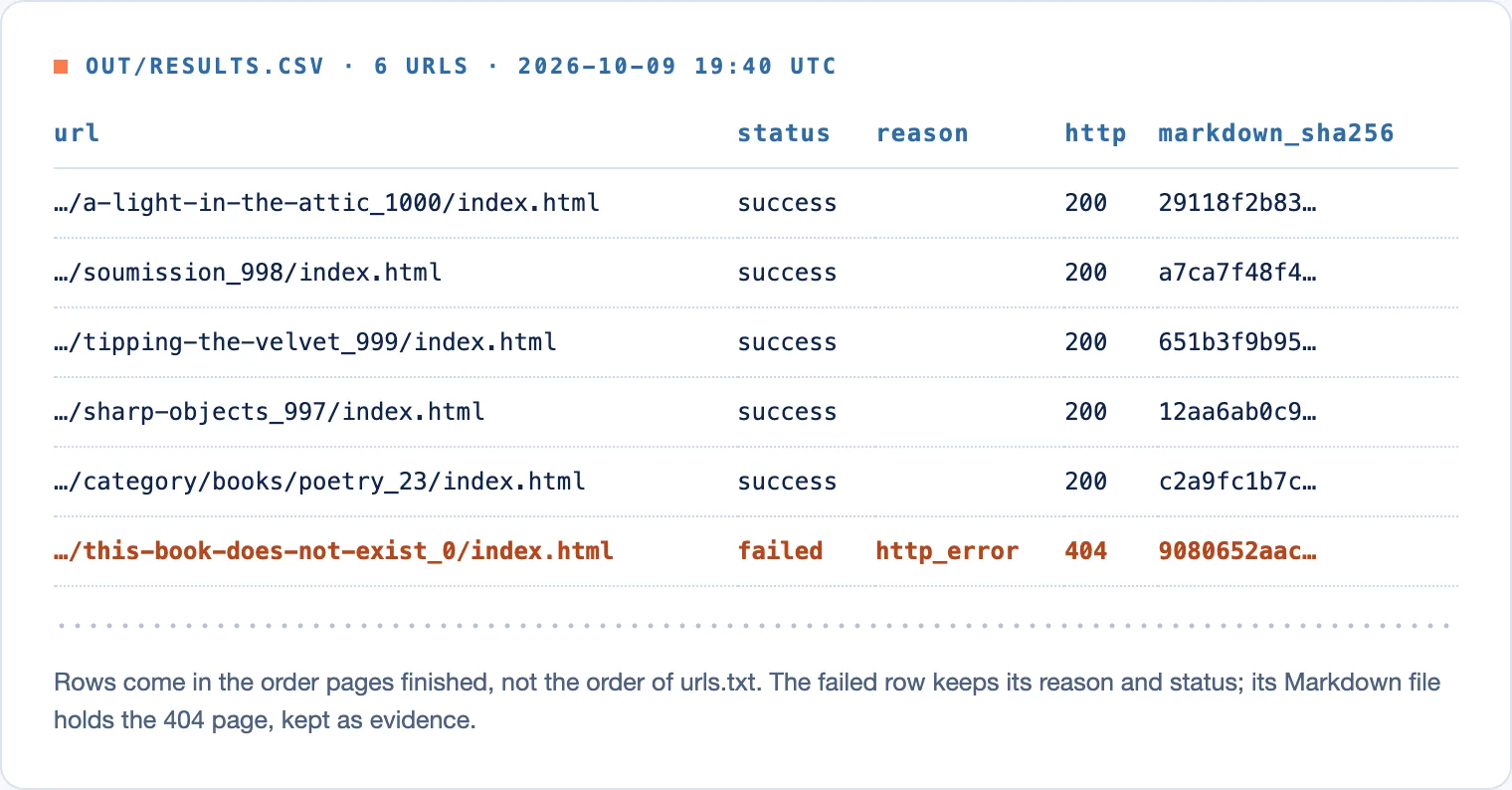
Two things in that table are easy to miss:
- Rows come in the order pages finished, not the order of your file.
soumissionwas third inurls.txtand second in the CSV. The numbers in the Markdown file names follow the same order. Join onurlrather than on position. - The failed row has a Markdown file too. It holds the site’s 404 page, 34 characters of “404 Not Found”, kept as evidence of what the server said. Its JSON line says so:
the server answered 404; the markdown is that error page, not the requested page; check the link.
How do you find and handle the URLs that failed?
Filter on status, never on whether there’s a Markdown file. Only success and partial carry the page’s content. Everything else is a row to look at:
status |
Typical reason |
What to do |
|---|---|---|
failed |
http_error, timeout, dns_error, connection_error |
Check the link; retry later for timeouts and connection errors. |
blocked |
captcha, login_wall, rate_limit, cloudflare_challenge |
The site refused an automated reader. Don’t retry at once. |
budget_exceeded |
time, pages |
Raise the limit you set, or split the list. |
The exit code doesn’t tell you about failed rows: a batch that finished exits 0 even when some pages failed, as ours did. Read report.json’s failed count, or the CSV:
awk -F, '$2 != "success" && $2 != "partial"' out/results.csvTo retry, put the failed URLs in a new file and run a new batch. Octocrawl doesn’t retry failed rows by itself.
What if the batch stops halfway?
Press Ctrl-C and the batch pauses instead of ending. Start the local API on the same task folder (npx octocrawl serve --task-root .w2l/cli) and it picks up where it stopped, skipping pages it already read. The rows already read are kept in that folder.
From an agent, the local MCP server has the same batch: batch_scrape starts it and returns a taskId, wait_batch waits, and get_batch_items pages through the rows, up to 50 at a time, with a cursor for the next page. Page until there’s no cursor left, and read every row’s status.
When is a batch the wrong tool?
- On hosted Octocrawl. It serves
scrapeandmaponly. A batch runs on your computer, with no daily limit. - More than 1,000 URLs. Split the list into several batches.
- Pages behind a login. Add
--lane my-browserto read them in your own Chrome, one at a time. - You don’t have the URLs. A batch reads only the list. To follow links from a start page, use
npx octocrawl crawl.
FAQ
How do I scrape multiple URLs at once for free?
Run npx octocrawl batch on your computer. It’s open source, needs no account, and has no daily limit. It reads up to 4 pages at a time.
Can I get the results as a CSV?
Yes. --out writes results.csv with one row per URL and its evidence columns. Add --formats markdown to get each page’s text as a file beside it.
Six URLs in, six rows out, and the one that failed says why. Keep the denominator whole and the rest of your pipeline can trust the count. To turn those Markdown files into chunks with sources, see web scraping for RAG.