Web scraping for RAG: clean Markdown, and a source for every chunk

Web scraping for RAG is turning web pages into clean text that a retrieval pipeline can split, embed and cite, with each chunk keeping the address and time of the page it came from. The scraping half decides how good your answers can be: tables that survive, navigation that doesn’t, and a source you can show the reader.
We ran the whole path on 2026-10-09, then ran it again two hours later, hosted and local on Octocrawl 0.3.2, to check every number: one page through the hosted API, six pages through a local batch, and a short Python script that turned them into 47 chunks both times. Octocrawl does the reading and records where each page came from. Splitting and embedding stay in your code.
Why Markdown, and not HTML, for a RAG pipeline?
Markdown represents headings, lists, tables and code without their surrounding HTML. Headings give a retrieval pipeline places to split. Compare the extracted sections with the source and measure token use with your embedding model’s tokenizer; the best format depends on the task.
We read the Python json module docs through hosted Octocrawl with no account:
curl -s https://api.octocrawl.dev/v1/scrape \
  -H 'content-type: application/json' \
  -d '{"url": "https://docs.python.org/3/library/json.html", "formats": ["markdown"]}'
In the second run it came back in 1.4 seconds as success: 33,037 characters of Markdown with 12 headings, 2 tables and 15 code blocks. One of the tables, as written:
| JSON | Python |
| --- | --- |
| object | dict |
| array | list |
| string | str |
| number (int) | int |
With the default onlyMainContent: true, navigation, footers, sidebars, forms, buttons, scripts, cookie banners and ads are left out. Code becomes fenced blocks, labelled with the language when the page names it, and relative links become absolute. A site’s own marks stay. The Python docs put a [¶](#…) link after each heading, and it’s in the Markdown, so strip it in your pipeline if you don’t want it.
Two more details matter for chunk sizes. usage.contentTokens (8,260 for this page) is an estimate, about one token per four characters, not your model’s tokenizer. And there’s no length limit: a long page comes back whole, so split it yourself.
What should each chunk keep from its page?
Keep enough to cite the chunk and to know when it’s stale. The answer’s evidenceRecord has all of it. From our 2026-10-09 read of the same page:
{
  "finalUrl": "https://docs.python.org/3/library/json.html",
  "fetchedAt": "2026-10-09T18:17:19.002Z",
  "httpStatus": 200,
  "outputSha256": { "markdown": "abec4b896a640b5115e809f43bd71b8decdf8842a7281f29d0499e10d588142d" },
  "extractor": { "name": "extract-tf", "version": "extract-tf/16" }
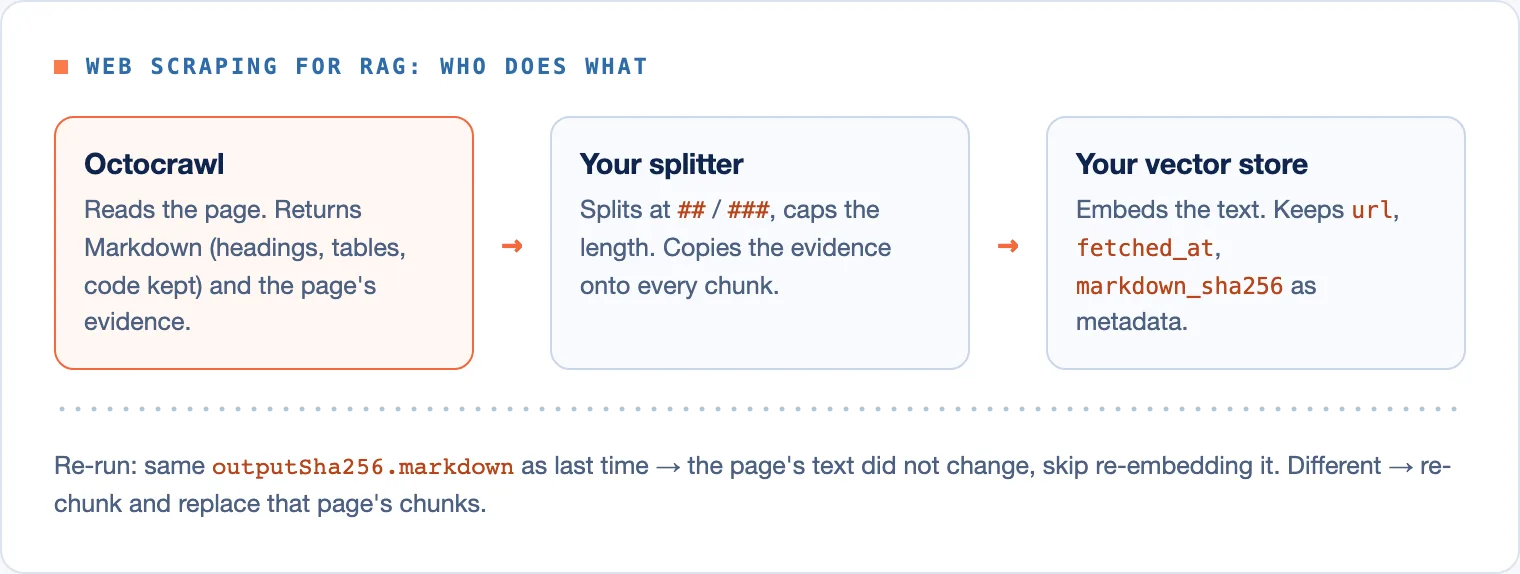
}finalUrlandfetchedAtare what you show next to an answer: where the text was read, and when.outputSha256.markdownis the SHA-256 of the Markdown as delivered. Hash the Markdown you received as UTF-8 and it should match. It did in our runs, hosted and local.rawSha256hashes the response body instead. Many sites change their HTML between fetches (a session token, a timestamp) while the text stays the same, so don’t deduplicate on it.
How do you scrape many pages for a RAG corpus?
Pick the pages first, then read them in one batch. Finding all pages on a website covers the first step in detail. On your own computer, with no daily limit:
npx octocrawl map https://docs.python.org/3/tutorial/ --limit 6 > map.json
jq -r '.links[].url' map.json > urls.txt
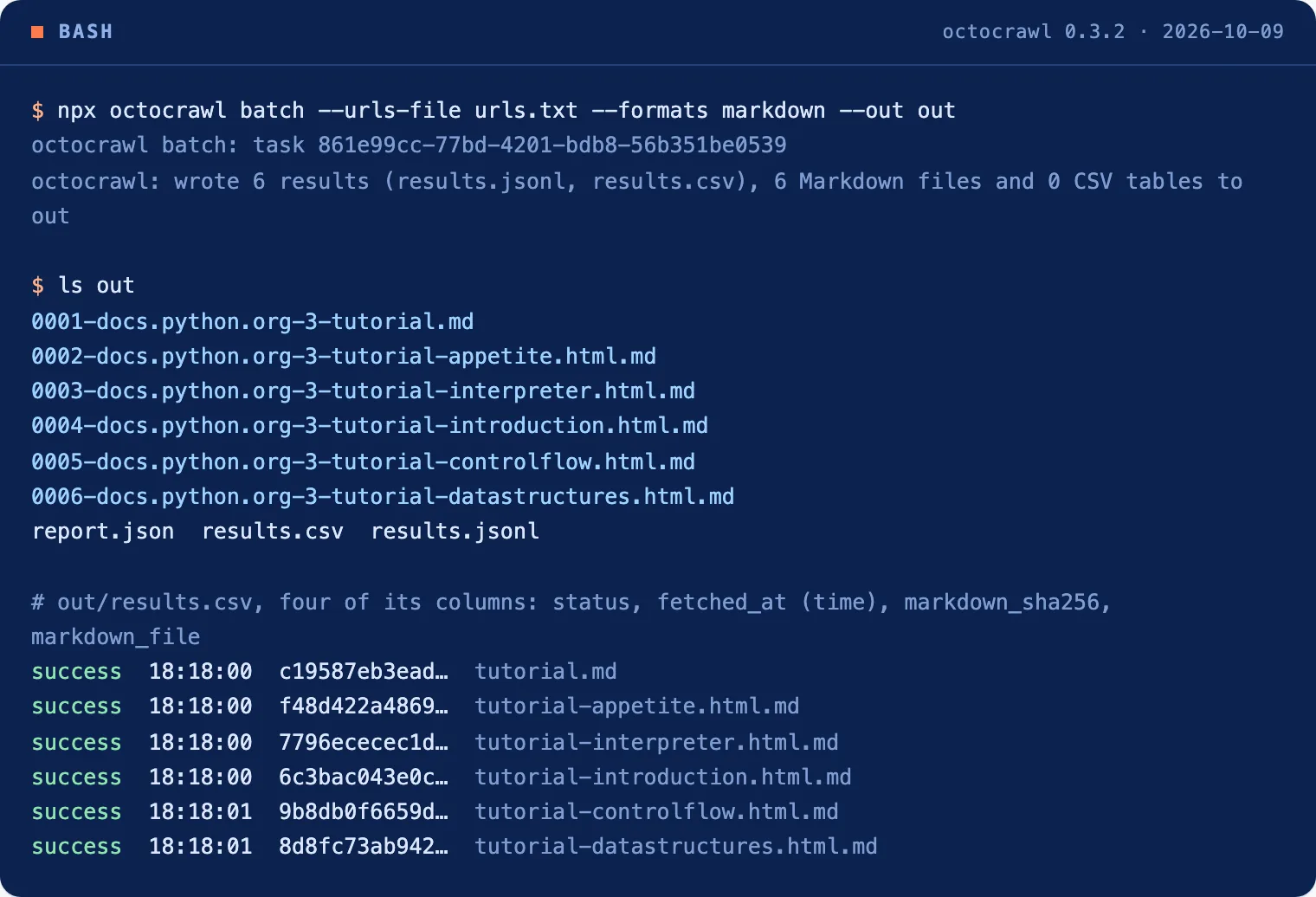
npx octocrawl batch --urls-file urls.txt --formats markdown --out out
map returned the tutorial’s first 6 pages, and batch read all 6 as success in 5 seconds. The out/ folder then held one Markdown file per page, plus results.csv (one row per page with final_url, fetched_at, status, markdown_sha256 and the Markdown file’s name), results.jsonl (each page’s whole answer) and report.json.
Batches take 1 to 1,000 URLs. For bigger lists and for keeping failures, see scraping a list of URLs.
How do you turn scraped pages into chunks with sources?
With npx octocrawl serve running in another terminal, the Python client (pip install octocrawl-client) reads the batch, and a few lines split it by section:
import json
import re

from octocrawl_client import W2L

urls = [line.strip() for line in open("urls.txt") if line.strip()]

with W2L() as client:  # http://127.0.0.1:8787, where `npx octocrawl serve` listens
    job = client.batch(urls, formats=["markdown"])

with open("chunks.jsonl", "w") as out:
    for item in job.items:
        # Conservative ingestion: send partial results for review separately.
        verification = item.get("verification") or {}
        readiness = item.get("readiness") or {}
        if (item["status"] != "success"
                or not (item.get("markdown") or "").strip()
                or verification.get("status") == "failed"
                or readiness.get("state") in ("not_loaded", "not_extracted", "not_served")):
            print("skipped", item["url"], item["status"], item.get("failureReason"))
            continue
        evidence = item["evidenceRecord"]
        # One chunk per section: split before each ## or ### heading.
        sections = re.split(r"\n(?=#{2,3} )", item["markdown"])
        for n, text in enumerate(sections):
            out.write(json.dumps({
                "id": f"{evidence['outputSha256']['markdown'][:16]}-{n}",
                "url": evidence["finalUrl"],
                "fetched_at": evidence["fetchedAt"],
                "markdown_sha256": evidence["outputSha256"]["markdown"],
                "text": text.strip(),
            }) + "\n")
The original version of this example ran against the same 6 URLs with octocrawl-client 0.3.2 on 2026-10-09 and wrote 47 chunks, from 1 for the shortest page to 19 for the longest. The guard above was tightened on 2026-10-16 and checked on synthetic results; those historical URLs and counts were not rerun for this update. One historical chunk:
{
  "id": "7796ececec1d7b26-1",
  "url": "https://docs.python.org/3/tutorial/interpreter.html",
  "fetched_at": "2026-10-09T18:18:34.976Z",
  "markdown_sha256": "7796ececec1d7b2694653908dbca0bf7bf476c5f0f2ea4b6d496bdf713d182f3",
  "text": "## 2.1. Invoking the Interpreter[¶](#invoking-the-interpreter)\n\nThe Python interpreter is usually installed as …"
}
Sections vary a lot: the largest here was 17,212 characters. If your embedding model takes less, split further by paragraph or by length. The chunk ID starts with the page’s Markdown hash, so a re-run that gets the same text produces the same IDs.
How do you avoid re-embedding pages that didn’t change?
Compare outputSha256.markdown with the hash you stored last time, and skip the page when they match. In our runs it was stable. In the second run the json docs page gave the same hash through hosted Octocrawl and through the local CLI, the same as in the first. All six tutorial pages gave the same hashes in two separate local batches, with no shared cache, and matched the first run’s batch.
What about pages that fail?
Keep fetch status, readiness and task verification separate. The example skips partial results for review, empty Markdown, failed contract checks and explicit unreadiness. A success with verification.status: "not_requested" remains unverified: check that the needed content is present or define a task contract before treating it as complete. Missing verification or readiness is unknown. Another fetch status may still carry Markdown kept as evidence, such as an error page. In the original 2026-10-09 run, adding an address that answers 404 made the original script print skipped https://docs.python.org/3/tutorial/does-not-exist.html failed http_error and write the same 47 chunks from the other six pages. A failed URL stays in the batch record even though it produces no chunks.
When isn’t this the right setup?
- Pages built by JavaScript. Without a key, hosted Octocrawl reads over plain HTTP. A page that only fills in its content in a browser needs the browser lane, with a key or on your computer.
- Scanned PDFs. Octocrawl reads a PDF’s text layer, with a
<!-- page N -->line before each page. A scan has no text layer, and there’s no OCR. - Chunking and embedding. Octocrawl doesn’t do either. Keep your splitter and your vector store.
FAQ
What’s the best format to feed web pages to an LLM?
Markdown, for most pipelines. It keeps headings, lists, tables and code, drops markup, and gives you section boundaries to split on.
How big should RAG chunks be?
It depends on your embedding model’s limit and your questions. Splitting at ## and ### headings keeps related text together. Then cap each chunk by length, since a single section can run to thousands of characters.
Can I scrape a website for RAG without code?
For one page, yes: paste it into the Octocrawl page and download the Markdown. For a corpus, the CLI or the Python client is faster.
How do I cite sources in a RAG answer?
Store the page’s final URL and fetch time on every chunk, and show them next to the passage the answer used. The hash tells you whether the page has changed since.
The 47 chunks above each know where they came from and when. That’s the part a vector store can’t add later. Field by field, the Evidence Record lists everything a page carries.